Mena also posted pictures of today's Bay Area blizzard. Those lucky Petaluma school kids got a snow day.
If you don't like the sentence "The quick brown fox...", you can open the script with a text editor and scroll down to the third section titled "set some variables". Then change the sentence to whatever you like and save. Maybe, "Jackdaws love my big sphinx of quartz." more.
Font Browser
The Short Font Story
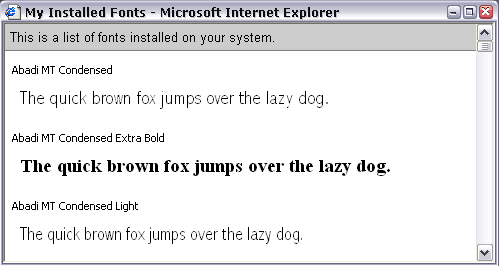
I made this font browser thing that shows all of your installed fonts (along with a sentence in the face) on a web page. (screenshot) If you're on Windows 2000 or XP and you want a quick look at your fonts, check it out:
Font Browser
(right-click, "Save Target As...", then double click the icon.)
The Long Font Story
The other day I needed to choose a font and I couldn't find a good way to browse all of the fonts on my system at once. I could only look at them one at a time with Microsoft's Font Viewer. That was time consuming, but it worked. (I know there are probably programs out there to help me out, but what I want to do is very simple and I shouldn't need to install a big program just to browse fonts.) I decided WSH (Windows Scripting Host) could be my answer.
Windows has this fine scripting API, but they don't make it simple to use. The standard FileSystem object and the standard Registry functions were no help in reading font names so I delved into the world of WMI (Windows Management Instrumentation). It's a dark murky land where commands are cryptic and documentation is lacking. It did the trick, though. And along the way I learned that I can check the temperature of my processor and manually fire up the fan. And other neat tricks.
The Font Disclaimer
There's nothing out of the ordinary happening in the script, but it's always a good idea to take a look at the source before you run it. I tried to note what each function does in the code.
Tom Tomorrow blog! [via matt]
It snowed last night for the first time since I've been in California. I spent the morning outside taking pictures and enjoying the view as the sun came up. I was sure the snow would be gone as soon as the sun hit. But it was a pretty good amount, and it's still covering everything.

Isn't this weird?
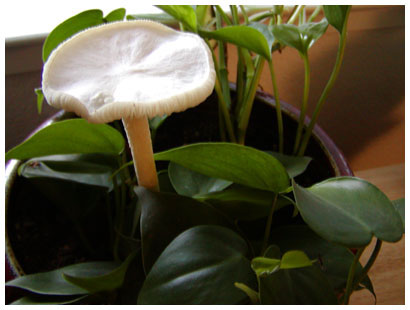
There's a mushroom growing in one of our houseplants. I won't be eating it. Any mycologists out there who can tell me what kind this is? And how it got in my house?

sxswb is back! (though at a slightly different location.) Stop by to discuss all things related to the South By Southwest Interactive conference happening in March.
Update: sxswb.com now points to sxswbaby!
I'm not sure why a national opt-out list for telemarketers is a great idea. Why should the burden of "opting-out" be on the people being annoyed? I think there should be a national "opt-in" list. If your name is on it, you can receive annoying sales calls...everyone else is opted-out by default.
Have you ever noticed that people outside the US say touch wood instead of knock on wood? It's so gentle. I think you have to knock to get the full luck going.
I'm sick like meg. And I was on that hike. And I also said, "I never get sick either now that I'm in California." Forgot to knock on wood. And I was surrounded by trees. Now I sound like Barry White. If Barry White had congested sinuses.
Here's an O'Reilly interview with Brewster Kahle about the Wayback Machine. [via evhead] I enjoyed this answer about using existing knowledge (which seems almost counter-intuitive in the tech world): "The first company I worked in was Thinking Machines. And we blew it. We built the fastest computer in the world that very few people could program. It required people to think in a new way. What a horrible thing to have to do to be able to attract customers. The idea is to be able to think the same and be able to do more." Think Different?
A question in yesterday's letters to the editor in my local paper: "Who hurt America more, Ken Lay or John Walker?"